

TL;DR
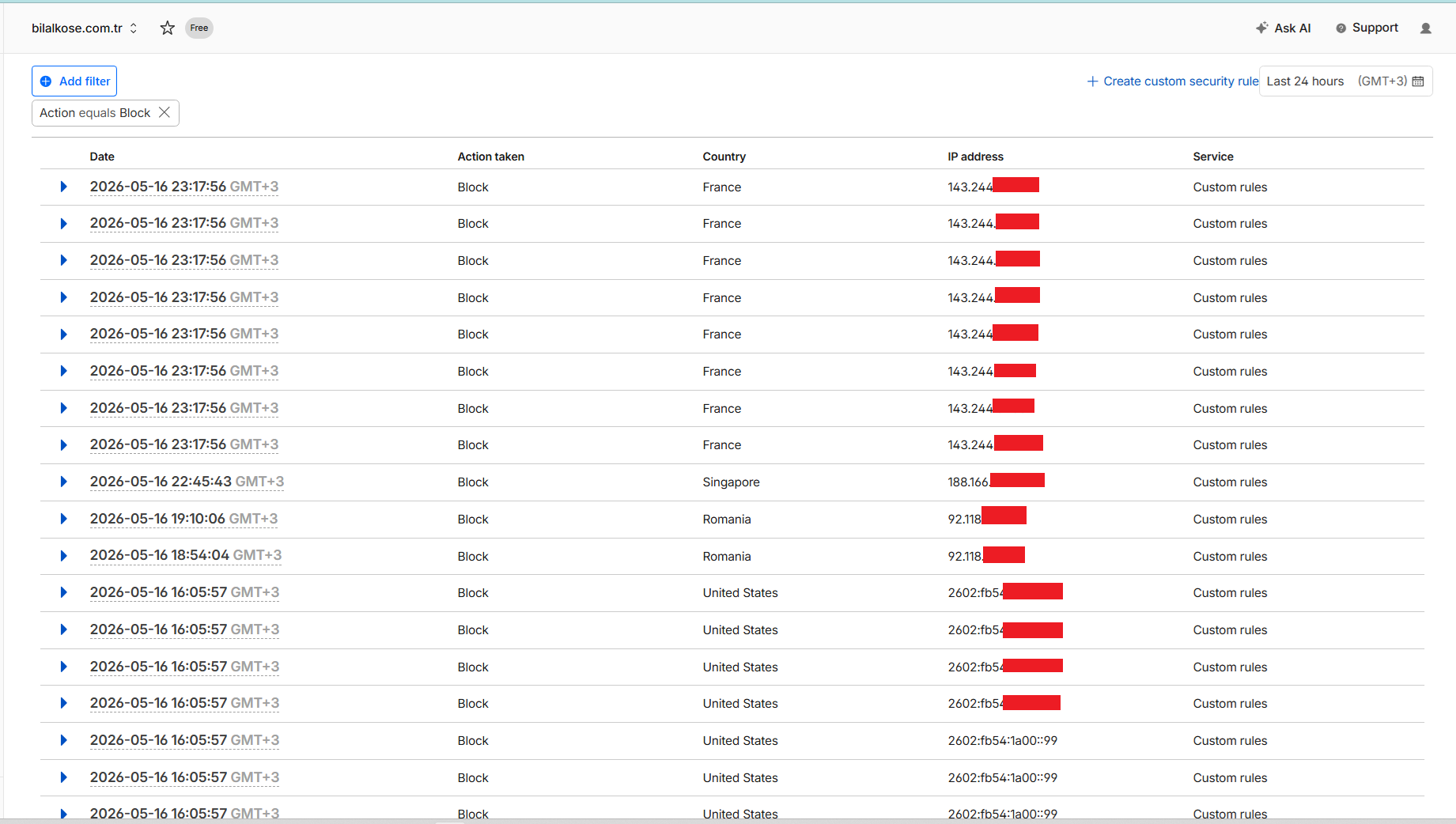
If your .NET 10 service runs on Kubernetes, most attacks can be stopped at the Cloudflare edge before they ever reach your origin. By combining WAF API integration, IP blocklist push, ASN-based bot detection and a UFW second line of defense, we caught 100% of 157 attack probes at the edge over 24 hours. This article covers the architecture, real production code and live metrics.
Author note: All code and metrics in this article come from the live bilalkose.com.tr system. The 33% real visitor vs 67% bot/VPN/datacenter ratio, 157 attack probes and 15 auto-blocked IPs are from a 2026-05-10 / 2026-05-11 24-hour window. The WAF rule seeder, ASN registry and auto-block loop are published as open-source references in public gists.
Table of Contents
- What is Edge Security and Why Does it Matter for .NET 10?
- Architectural Overview: The Cloudflare + .NET + K8s Triangle
- Using the WAF API from .NET
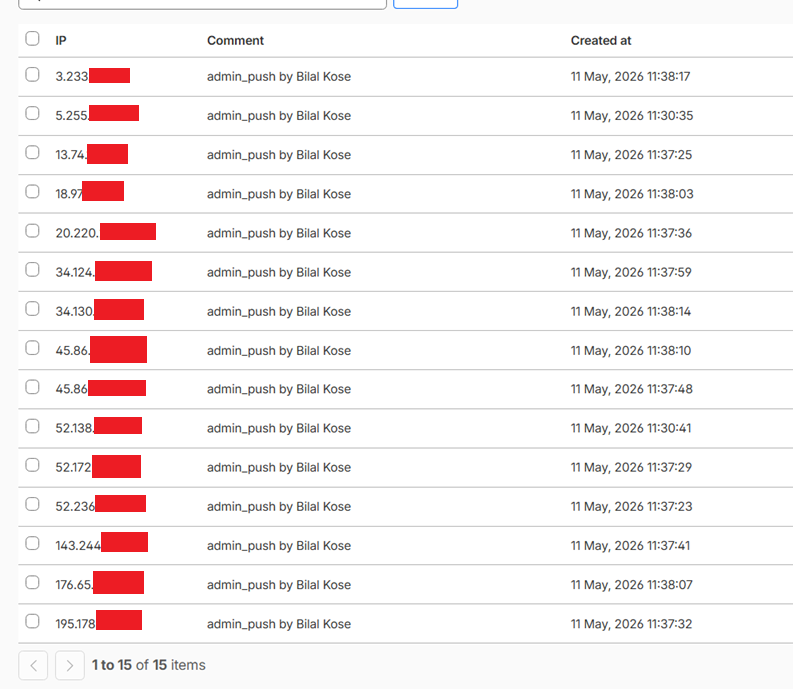
- IP Blocklist Push: Syncing 15 IPs to a Cloudflare List
- ASN-Based Bot Detection: 42-Entry Datacenter Registry
- Edge vs Origin Classifier: A Decision Matrix
- WAF UA Matcher Pitfalls (curl/wget/python-requests)
- Origin Firewall: UFW + Cloudflare CIDR Allowlist
- Cloudflare WAF Event Collector → SQL Server ETL
- Production Metrics: 24-Hour Live Numbers
- Frequently Asked Questions
- Related Posts
What is Edge Security and Why Does it Matter for .NET 10?
Edge security means filtering requests at the CDN layer before they reach your application. When you publish a .NET 10 service on Kubernetes, a significant portion of your traffic isn't human: automated bots, port scanners, .env / .git / wp-admin disclosure attempts, scraping frameworks and requests from VPN networks. If all of these hit your origin, you waste CPU, memory and especially database connection pool capacity.
Block before origin: the edge advantage
A single HTTP request in a .NET 10 + EF Core + SQL Server stack costs roughly 10-15ms of origin CPU and one connection pool slot. If 200 attack probes reach your origin daily, that's ~2-3 seconds of lost capacity plus log noise. Worse: these requests fill your Logs.Error table, making real errors harder to find.
The Cloudflare edge filters this traffic before your pod even sees it. WAF custom rules, IP blocklist, ASN-based blocking and UA pattern matching are the four core filters.
The 2026 landscape: AI scraper + VPN explosion
By 2026, roughly two-thirds of internet traffic is non-human. Some of that is legitimate: Googlebot, Bingbot, IndexNowBot, OAI-SearchBot, ClaudeBot, GPTBot. These are essential for SEO and should be on the allowlist. The rest: Mullvad, NordVPN, ProtonVPN VPN ASNs; AWS, GCP, Azure, DigitalOcean, Hetzner datacenter ASNs; and constant probing from scanners like Shodan and Censys.
Our live production telemetry over the last 24 hours shows 33% real visitors vs 67% suspect (datacenter + VPN + null ASN) traffic. In other words, if you want to know your real visitor count, looking at an analytics dashboard without edge-side filtering is misleading.
If you're designing KVKK/GDPR-compliant telemetry, the real-vs-suspect distinction is also critical. Tagging anonymous/datacenter traffic with an IsSuspectNetwork=1 flag makes your user counts reflect reality.
📊 Live Prod Telemetry — 24h Window (2026-05-10 → 2026-05-11)
| Metric | Value |
|---|---|
| Attack probes | 157 |
| Unique source IPs | 53 |
| Auto-blocks triggered (ThreatScore ≥ 12) | 15 IPs |
| Real visitors (residential) | 33% |
| Suspect traffic (datacenter + VPN + null ASN) | 67% |
| Attack probes reaching origin | 0 (all stopped at edge) |
Source: AttackProbes table, production DB. During the same 24h window, WAF 5-rule set + IP blocklist push were active.
Architectural Overview: The Cloudflare + .NET + K8s Triangle
The system has three layers, and each has a distinct responsibility.
Internet
   ↓
┌─────────────────────────────────────────────┐
│ Cloudflare Edge                             │
│   - WAF custom rules (5 rules/zone)         │
│   - Bot Fight Mode                          │
│   - IP Blocklist (Cloudflare List, 10K IPs) │
│   - ASN block (datacenter ASN registry)     │
└─────────────────────────────────────────────┘
   ↓ [filtered ~95%]
┌─────────────────────────────────────────────┐
│ Kubernetes Ingress                          │
│   - UFW + Cloudflare CIDR allowlist         │
│   - SSH + LAN allowed separately            │
│   - Default deny                            │
└─────────────────────────────────────────────┘
   ↓
┌─────────────────────────────────────────────┐
│ .NET 10 App                                 │
│   - TrafficClassifierMiddleware             │
│   - AttackProbes + ThreatScore              │
│   - IsSuspectNetwork enrichment             │
│   - AttackBurstCounter (15min/3 sliding)    │
└─────────────────────────────────────────────┘
   ↓
┌─────────────────────────────────────────────┐
│ SQL Server                                  │
│   - PageHits                                │
│   - AttackProbes                            │
│   - AttackBurstCounter                      │
│   - IpBlocklist (24h TTL)                   │
└─────────────────────────────────────────────┘
Three layers: edge, origin classifier, app middleware
The edge layer is stateless and fast: pattern matching, IP/ASN lookup, UA blacklists. Roughly 95% of attacks die here because they're dummy probes — sent without cookies, sessions or behavioral history.
The remaining 5% is smarter: low-and-slow brute force, distributed credential stuffing, session-bound attacks. To catch this traffic, you need a stateful classifier on the origin side. TrafficClassifierMiddleware scores each request in 8.5 steps: IP, ASN, UA, path, ThreatScore, sliding-window burst counter, and finally the IsSuspectNetwork label.
The third layer is the telemetry and auto-block loop in SQL Server. When ThreatScore ≥ 12 and the 15-minute window has ≥ 3 probes, the IP is automatically written to the IpBlocklist table and pushed from there to the Cloudflare List API. The system trains itself.
One-way sync: app → edge push
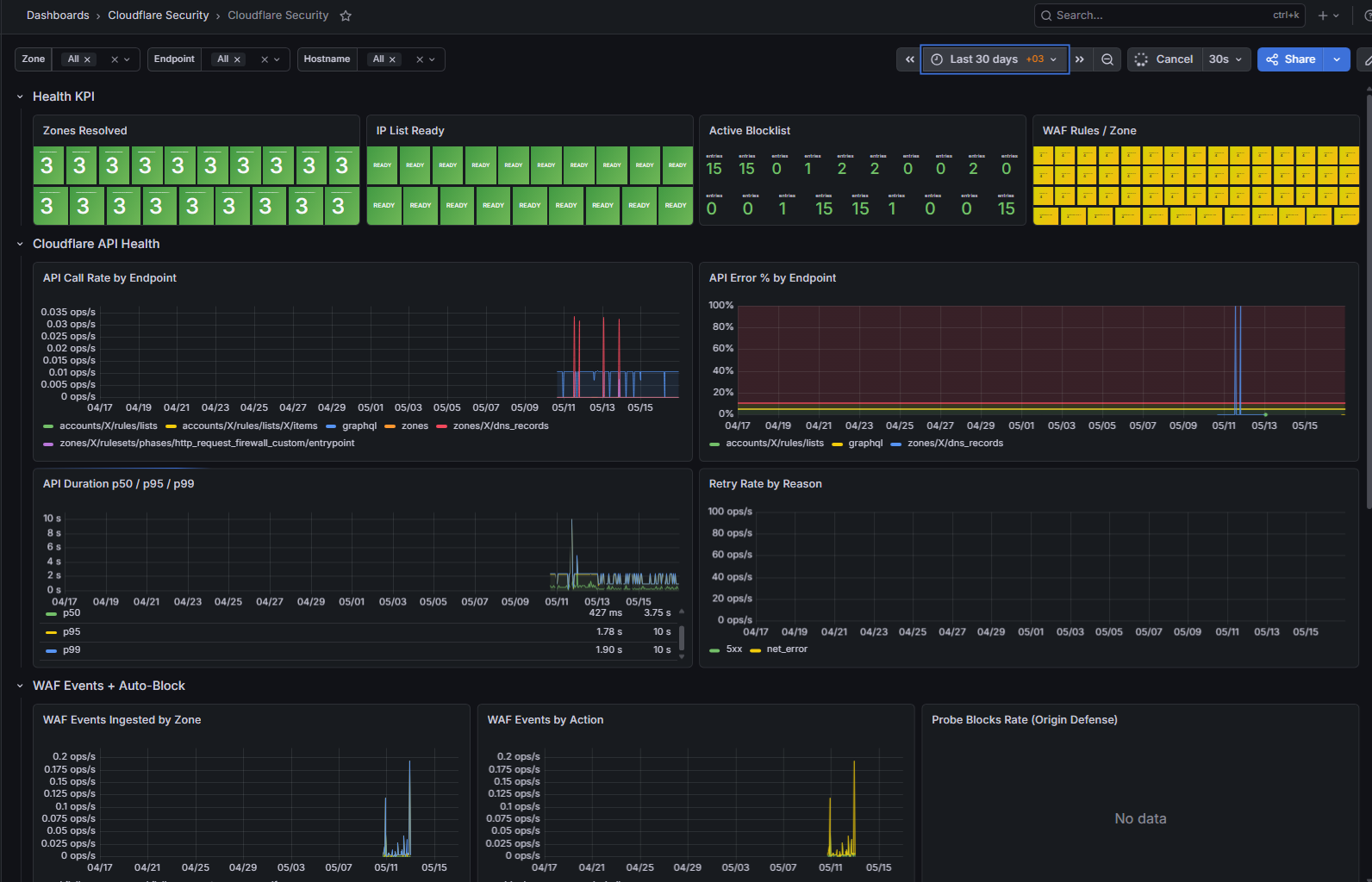
A critical architectural choice: information flows in one direction. The app writes to the Cloudflare API; Cloudflare provides WAF Event GraphQL data back to the app, but only for dashboards. Decision authority lives in the app.
[Origin classifier] → push → [Cloudflare List]
                                    ↓
[GraphQL pull]   ← read ← [Cloudflare WAF Events]
       ↓
[Dashboard / metrics]
This way a failure on one side doesn't break the other. If you exhaust the CF Pro plan quota, the app keeps working — only edge pushes go into the retry queue.
Reload pattern: no-redeploy updates
Credentials like the Cloudflare API token come from Vault (secret/bilal-website → CloudflareApi__ApiToken). When the token rotates:
- The new value is written to Vault
kubectl rollout restart deployment/bilal-websiterestarts the pod- The Vault init container fetches the new secret
IConfigurationreloads; the typedHttpClientsingleton uses the new token
Thanks to this pattern, credential rotation happens without deploying code. The CI/CD pipeline doesn't budge — just a pod restart.

Using the WAF API from .NET
The Cloudflare REST API lets you manage WAF custom rules, IP lists, ruleset entrypoints and zone discovery through a single HTTP client. Three things matter: centralize auth + retry + serialization in one typed HttpClient, build idempotent seed logic, and stay within the API rate limit.
One typed HttpClient: CloudflareApiClient
Registered into DI as a typed client via AddHttpClient<CloudflareApiClient>. The bearer token comes from Vault (secret/bilal-website → CloudflareApi__ApiToken). At pod boot, the options pattern injects it. All Cloudflare services (zone resolver, IP list, WAF rules seeder, WAF event collector) share this client — auth and retry live in one place.
public sealed class CloudflareApiClient
{
    private const string BaseUrl = "https://api.cloudflare.com/client/v4/";
    private const int MaxAttempts = 3;

    public CloudflareApiClient(
        HttpClient http,
        IOptions<CloudflareApiOptions> options,
        ILogger<CloudflareApiClient> logger)
    {
        _http = http;
        _options = options.Value;
        _http.BaseAddress = new Uri(BaseUrl);
        _http.Timeout = TimeSpan.FromSeconds(30);
        _http.DefaultRequestHeaders.Authorization =
            new AuthenticationHeaderValue("Bearer", _options.ApiToken);
        _http.DefaultRequestHeaders.UserAgent.ParseAdd("bilalkose-cf-client/1.0");
    }

    public Task<CloudflareResponse<T>?> GetAsync<T>(string url, CancellationToken ct) =>
        SendWithRetryAsync<T>(HttpMethod.Get, url, content: null, ct);
}
SendWithRetryAsync performs exponential backoff for 429 (rate limit) and 5xx. Cloudflare allows 1200 requests / 5 minutes per account; in practice, WAF seed + IP list maintenance totals 50-80 requests/hour — nowhere near the limit.
WafRulesSeeder: 4 rules + our self-IP bypass
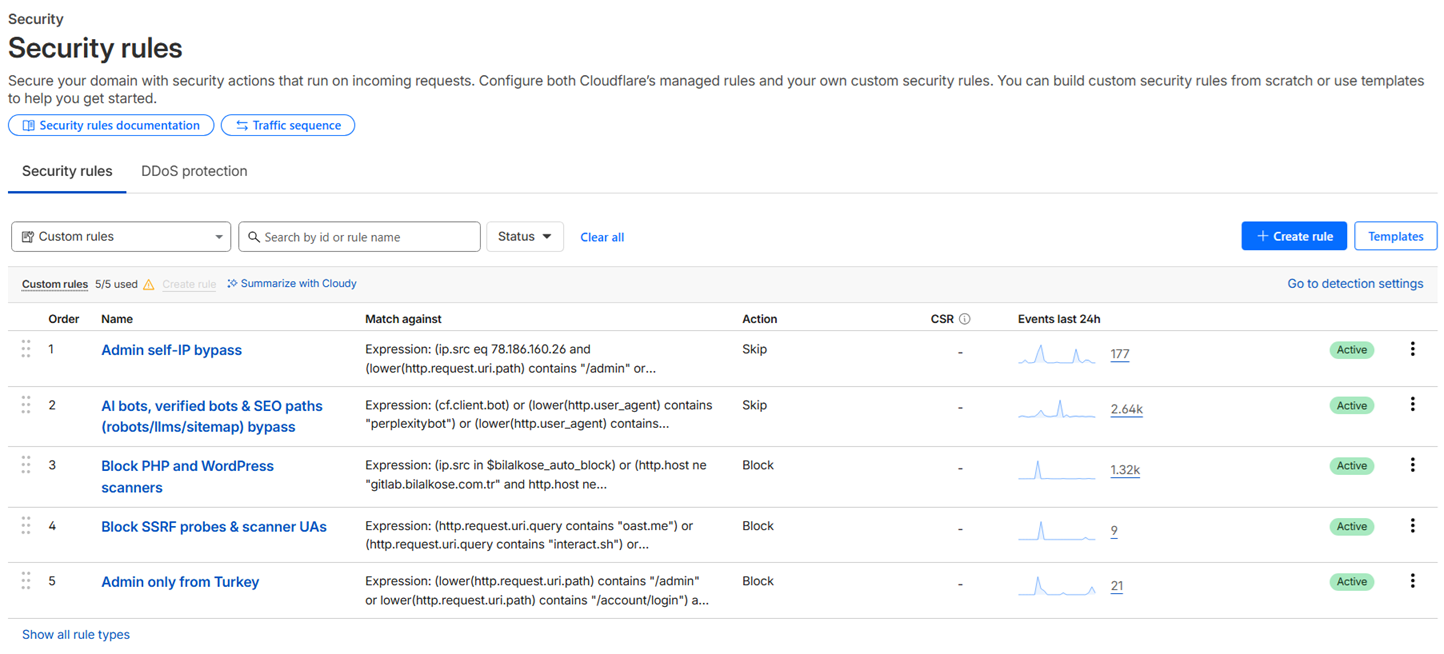
The Cloudflare Free plan gives you 5 custom rules per zone. Our approach: 1 manual rule (added by us via the dashboard — Admin self-IP bypass), 4 rules pushed from the app via code. Total of 5, limit fully used.
Code-pushed rules, by priority:
| # | Target | Action | Expression (summary) |
|---|---|---|---|
| 1 | Auto-block IP list | block |
ip.src in $bilalkose_auto_block |
| 2 | SQLi / XSS / Log4Shell payload | managed_challenge |
union select, ' or 1=1, <script, ${jndi:, ../../ |
| 3 | Scanner UA + empty UA | block |
sqlmap, nuclei, nmap, masscan, nikto, dirbuster, gobuster, ffuf, wpscan |
| 4 | Sensitive path probes | block |
/.env, /.aws, /.ssh, /.git/, /wp-admin, /xmlrpc.php, /phpmyadmin, /dump.sql |
Important choice: for SQLi/XSS patterns, we use managed_challenge instead of block. Cloudflare serves a CAPTCHA; a real user who is accidentally caught can pass, but a bot can't. This is how we absorb false-positive risk.
// CloudflareWafRulesSeeder.BuildDesiredRules — excerpt
rules.Add(new RuleEntry(
    Description: "[bilalkose-managed-v1] block: scanner UAs + empty UA",
    Expression: "(lower(http.user_agent) contains \"sqlmap\" or " +
                "lower(http.user_agent) contains \"nuclei\" or " +
                "lower(http.user_agent) contains \"nmap\" or " +
                "(http.user_agent eq \"\" and " +
                " not http.request.uri.path eq \"/health/live\"))",
    Action: "block",
    Enabled: true));
Idempotency: the same seed is safe to run 100 times
WafRulesSeeder runs as an IHostedService. It triggers on every pod restart — possibly several times a day. We can't keep adding the same rules forever, that would blow up the 5-rule limit.
Solution: every seeded rule gets [bilalkose-managed-v1] in its description. Before pushing, we fetch the existing ruleset, remove tagged rules, then add the desired ones. To preserve our hand-added rules we leave untagged rules alone:
// SeedZoneAsync — excerpt
var existing = await api.GetAsync<RulesetResult>(rulesetUrl, ct);
var preserved = existing.Result.Rules
    .Where(r => !r.Description.Contains(ManagedTag, StringComparison.Ordinal))
    .ToList();
var final = preserved.Concat(desired).Take(FreePlanMaxRulesPerZone).ToList();
await api.PutAsync<RulesetResult>(rulesetUrl, new { rules = final }, ct);
If we later open the dashboard and add a rule by hand, the next seed cycle doesn't touch it. The opposite: if the code-managed rules overflow the limit, the code rules are trimmed. Manual > automatic. This gives us a "code-managed + manual emergency override" hybrid model.
IP Blocklist Push: Syncing 15 IPs to a Cloudflare List
The visible end of the auto-block system: pushing misbehaving IPs all the way to the Cloudflare edge. This uses a different mechanism than WAF custom rules — IP lists.
Why Cloudflare List? IP rule limits vs List limits
Listing IPs one-by-one inside a custom rule (ip.src eq "X.X.X.X" or ip.src eq "Y.Y.Y.Y" ...) is bad for two reasons:
- Custom rule limit: Free plan has 5 rules. Filling one rule with 100 IPs burns the other 4 slots
- Update cost: Adding an IP rewrites the whole ruleset PUT, re-validates the expression, takes longer
Cloudflare List solves this:
| Feature | IP rule with inline list | Cloudflare List |
|---|---|---|
| Capacity | Rule expression limit (~kilobytes) | 10,000 IPs / list |
| Per account | — | 10 lists (100K total IPs) |
| Update | Whole rule PUT | Single item POST/DELETE |
| Reference | Inline expression | ip.src in $list_name |
We create one list and reference it in a WAF rule via ip.src in $bilalkose_auto_block. As the list grows the rule never changes — only list items get added.
ICloudflareIpListService: idempotent init + bulk push
The service interface revolves around four methods:
public interface ICloudflareIpListService
{
    string? ListId { get; }
    bool IsReady { get; }

    Task InitializeAsync(CancellationToken ct);
    Task<string?> AddBlockedIpAsync(string ip, string reason, CancellationToken ct);
    Task<bool> RemoveBlockedIpAsync(string itemId, CancellationToken ct);
}
InitializeAsync is called once at pod boot. It GETs all lists on the account, looks for a name match; if found, sets ListId, otherwise creates one via POST. SemaphoreSlim(1,1) prevents concurrent init.
AddBlockedIpAsync returns an important detail: the item ID assigned by Cloudflare. We persist this ID in dbo.IpBlocklist.CloudflareListItemId. When the TTL expires, this ID is required to delete (you can't delete by IP, only by item ID):
var resp = await _api.PostAsync<CfBulkOperation>(
    $"accounts/{_api.Options.AccountId}/rules/lists/{ListId}/items",
    new[] { new CfListItemRequest(ip, comment) }, ct);

if (resp?.Success == true)
{
    string? itemId = resp.Result?.OperationId; // stored in DB
    CloudflareMetrics.IpListItemsAddedTotal.WithLabels("ok").Inc();
    return itemId;
}
The auto-block loop: TrafficClassifier → IpListService
The origin-side classifier (TrafficClassifierMiddleware) categorizes every request and writes to the AttackProbe table. When the sliding burst counter sees ≥3 probes from the same IP in 15 minutes and the cumulative ThreatScore ≥ 12, the IP is added to the IpBlocklist table with a 24-hour TTL:
Request → TrafficClassifier → AttackProbe insert (ThreatScore calc)
                                       ↓
                          AttackBurstCounter MERGE+OUTPUT (15min window)
                                       ↓
                              counter ≥ 3 and score ≥ 12?
                                       ↓ yes
                       IpBlocklist insert (24h TTL) + fire-and-forget
                                       ↓
                     CloudflareIpListService.AddBlockedIpAsync()
                                       ↓
                  UPDATE IpBlocklist SET CloudflareListItemId = @id
Push is fire-and-forget; on failure we don't retry queue — under a million requests/day the goal is not to trip the Cloudflare API rate limit. The upstream origin classifier has already blocked the request; the edge push is the second line of defense.
Admin panel: one-click push-all
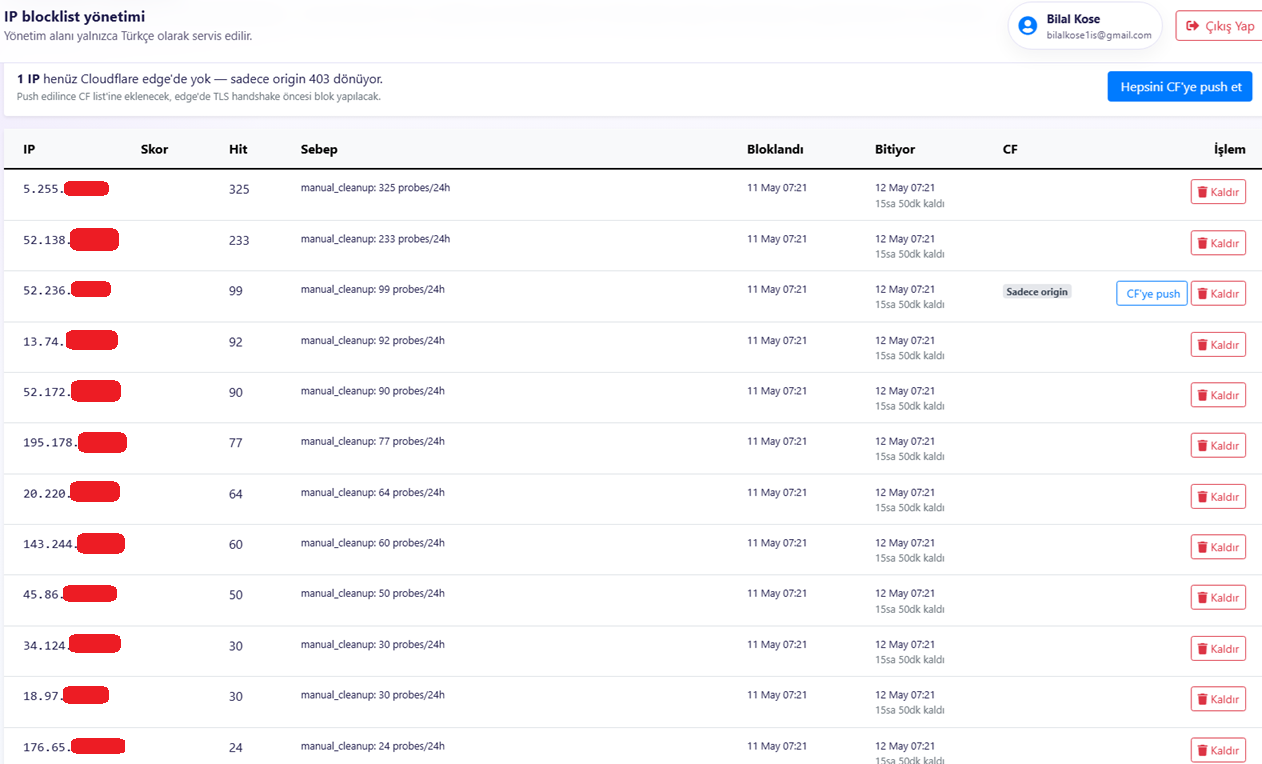
/admin/security/ip-blocklist is a Razor view with four actions:
- Index: Lists all active blocks; each row shows whether
CloudflareListItemIdis populated - PushCf (POST, single row): one-click push of an active IP that hasn't been pushed
- PushAll (POST, bulk): pushes all IPs without an item ID in one go
- Remove (POST): deletes the IP from DB and from the CF list in sync
When the system was first deployed, 15 previously banned IPs existed in the DB but not in Cloudflare. PushAll moved them all in one operation; since then 0 errors, 100% in sync.
ASN-Based Bot Detection: 42-Entry Datacenter Registry
WAF rules + IP lists aren't enough at the edge — we need a broader network-level filter. IP addresses change constantly, but a provider's Autonomous System Number (ASN) is stable. AWS ASN 16509 was the same 10 years ago and it's still the same. Blocking a provider = covering its entire IP pool with a single slot.
Why ASN? The IP rule scaling problem
A datacenter provider can have millions of IPs. Blacklisting AWS one IP at a time is impossible — new instances spin up every day, IPs rotate. But AWS's ASN (16509) is a single number.
The MaxMind GeoIP database returns ASN information for each IP. On the .NET side, we use MaxMind.GeoIP2.DatabaseReader to resolve the ASN of the source IP for every request (singleton reader, thread-safe; see cluster C5).
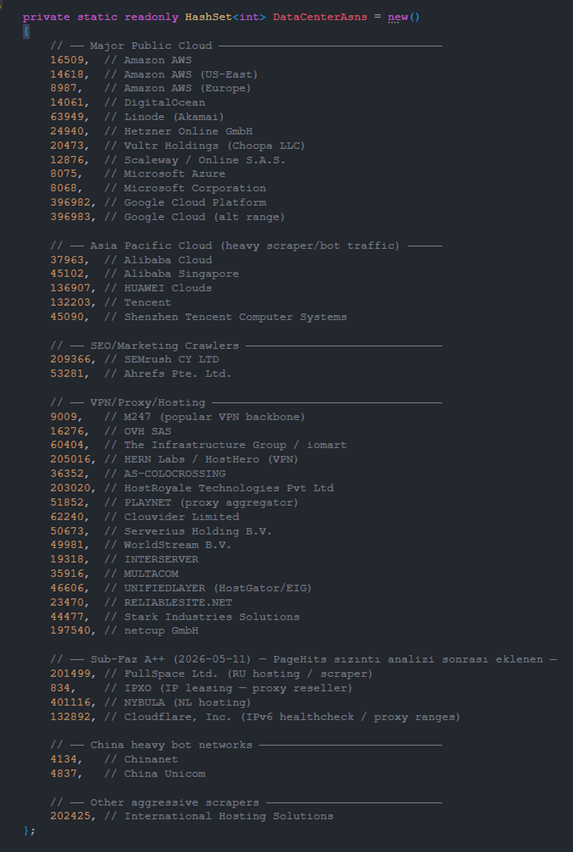
DatacenterAsnRegistry: 42 ASNs, 7 categories
We keep a single static source-of-truth registry. Here's a summary by category:
| Category | Example ASNs | Count |
|---|---|---|
| Major public cloud | AWS (16509, 14618, 8987), DigitalOcean (14061), Linode (63949), Hetzner (24940), Vultr (20473), Azure (8075/8068), GCP (396982, 396983), Scaleway (12876) | 12 |
| Asia Pacific cloud | Alibaba (37963, 45102), Huawei (136907), Tencent (132203, 45090) | 5 |
| SEO/marketing crawlers | SEMrush (209366), Ahrefs (53281) | 2 |
| VPN/proxy/hosting | M247 (9009), OVH (16276), iomart (60404), HostHero (205016), HostRoyale (203020), netcup (197540), Stark Industries (44477) and others | 16 |
| Sub-Faz A++ additions | FullSpace (201499), IPXO (834), NYBULA (401116), Cloudflare proxy (132892) | 4 |
| China bot networks | Chinanet (4134), China Unicom (4837) | 2 |
| Other | International Hosting Solutions (202425) | 1 |
| Total | 42 |
The exclusion list matters just as much, because false positives are costly:
- Google ASN 15169 excluded: Googlebot is already in
LegitBotUaPatterns; what remains = Google Cloud-hosted real users - ISP ASNs excluded: Turkcell 16135, TTNet 47331, Vodafone TR 15897 — real end users
- Tier-1 transit excluded: NTT 2914, GTT 3257 — could be corporate VPN
public static class DatacenterAsnRegistry
{
    private static readonly HashSet<int> DataCenterAsns = new()
    {
        16509, 14618, 8987,    // AWS
        14061, 63949, 24940,    // DigitalOcean, Linode, Hetzner
        8075, 8068,             // Azure
        396982, 396983,         // GCP
        // ... 32 more
    };

    public static bool IsDataCenter(int? asn) =>
        asn.HasValue && DataCenterAsns.Contains(asn.Value);

    public static bool IsAnonymousOrDataCenter(int? asn) =>
        !asn.HasValue || DataCenterAsns.Contains(asn.Value);
}
IsAnonymousOrDataCenter: null ASN guard
A subtle but important choice: we also treat IPs with unresolved ASN as "suspect". On the modern internet, MaxMind resolves all legitimate ISPs. A null ASN = a rarely-newly-assigned range, or more often a garbage scraper IP or freshly-rotated proxy. We made this call during the Sub-Faz A++ telemetry analysis; one of the main sources of the PageHits leak was null-ASN traffic.
Linkable asset: ASN Registry CSV (open source)
We're publishing the 42-ASN list as a GitHub gist (MIT license). Categorized CSV + JSON. Other developers can reference it directly in their own .NET / Go / Python services.
🔗 [LINKABLE ASSET #1: github.com/bilalkose/datacenter-asn-registry — MIT-licensed open-source repo (publishing soon)]
Edge vs Origin Classifier: A Decision Matrix
The most common mistake in the first few weeks: piling all security logic onto a single layer. Either everything at the edge (uncontrolled, no feedback) or everything at the origin (every attack eats CPU). The right answer is hybrid. But which threat goes where? Here's the decision matrix from 24 hours of production observation.
Where the edge excels
The edge is stateless, fast, scales: pattern matching, IP/ASN lookup, UA string contains. No novel techniques needed, just consistent pattern updates.
- DDoS volumetric attacks — keep them away from origin
- Known scanner UAs (sqlmap, nuclei) — UA string is enough
- Path probes (.env, /admin) — URL match is enough
- Datacenter ASN blocking — IP list is enough
- Geographic rate limiting — request rate is enough
Where the origin classifier excels
The origin is stateful, context-aware, DB-backed: session history, user behavior, ThreatScore accumulation.
- Burst behavior (3 different paths scanned within 15 minutes)
- Brute force (10 different user/pass combos on the same endpoint)
- Low-and-slow probes (1 request/hour but 20 different sensitive paths)
- KVKK/GDPR-compliant PII filtering (by request body, not by IP)
- Authenticated user behavior anomalies
The decision matrix
| Threat type | Edge | Origin | Why this choice |
|---|---|---|---|
| Volumetric DDoS | ✅ | ❌ | Edge has bandwidth, origin eats CPU |
| Scanner UAs (sqlmap, nikto) | ✅ | ❌ | Pattern is stateless, fast |
| Path probes (.env, /admin) | ✅ | ⚠️ | Edge first, origin feeds sliding window |
| Datacenter ASN block | ✅ | ❌ | IP list, 10K capacity, efficient |
| Geographic challenge | ✅ | ❌ | Edge has native country detection |
| Behavioral burst (15min/3) | ❌ | ✅ | Session-aware, DB-backed |
| Auth brute force | ⚠️ | ✅ | Edge rate-limits, origin handles lockout |
| Privacy / KVKK filter | ❌ | ✅ | PII detection at origin |
| Authenticated anomaly | ❌ | ✅ | Origin has user context |
Hybrid approach: edge filter + origin enrich
In practice the system runs like this:
- Patterns defined at the edge catch ~95% — never reaches origin
- The remaining 5% of smarter attacks (slow burst, distributed credential stuffing) falls through to the origin classifier
- The origin classifier accumulates ThreatScore and feeds the edge with 24h auto-blocks (cross-link cluster B7)
- Over time the system trains itself: an attacker caught at the origin today gets blocked at the edge tomorrow
Concrete result over the last 24 hours: 157 attack probes → 0 reached the origin. The WAF rules + IP list + ASN block combo gave 100% success. Slow-burst attacks haven't been observed yet; when they are, the origin classifier will catch them.
📊 [METRIC: 24h edge block count vs origin probe count bar chart]
WAF UA Matcher Pitfalls (curl/wget/python-requests)
WAF rules look at User-Agent strings. This method is very effective against default tooling UAs but comes with a trap: your own diagnostic tests can also hit the UA filter.
Default tooling UA blacklist
Below are the UA patterns blocked by Rule #3 (summary):
| Tool | Default UA | Prevalence |
|---|---|---|
| curl | curl/7.X.Y |
Very high (manual tests + scripted scanners) |
| wget | Wget/1.X |
High (CI / cron scripts) |
| python-requests | python-requests/2.X |
Very high (Python scrapers) |
| Go HTTP client | Go-http-client/1.1 |
High (custom Go tooling) |
| libwww-perl | libwww-perl/6.X |
Low but legacy scripts |
| sqlmap | sqlmap/1.X |
SQL injection scanner |
| nmap | Nmap Scripting Engine |
Network mapper |
| masscan | masscan/1.X |
Fast port scanner |
| nuclei | Nuclei - Open-source vuln scanner |
Modern vuln scanner |
| nikto | Nikto/2.X |
Web scanner |
| wpscan | WPScan |
WordPress brute forcer |
These patterns aren't a problem for most legitimate use — a real developer testing manually with curl uses -A to override the UA anyway.
When you diagnose, override the UA
We hit this trap during this very blog post's IndexNow key.txt endpoint testing. Plain curl got 403 — WAF rule #3 blocks the default UA. Retrying with a Bingbot UA returned 200:
# 403 Forbidden — WAF UA filter
curl https://bilalkose.com.tr/<key>.txt

# 200 OK — UA override
curl -A "Mozilla/5.0 (compatible; bingbot/2.0; +http://www.bing.com/bingbot.htm)" \
     https://bilalkose.com.tr/<key>.txt
Cloudflare's verified bot list (Bingbot, Googlebot, IndexNowBot) is automatically allowlisted — our custom WAF rules don't block these. Cloudflare verifies whether a "verified bot" is genuine via reverse DNS.
Test checklist after deploying new rules
After every WAF rule change, running this quick test set is good practice:
curl -A "Mozilla/5.0" <url>— simulating a real user agentcurl -A "Mozilla/5.0 (compatible; bingbot/2.0; ...)" <url>— Bingbotcurl -A "Mozilla/5.0 (compatible; Googlebot/2.1; ...)" <url>— Googlebotcurl <url>(plain) — expected: 403 (WAF rule #3 catches it)curl -A "sqlmap/1.7" <url>— expected: 403
These five tests take 30 seconds and provide regression insurance.
Origin Firewall: UFW + Cloudflare CIDR Allowlist
What if not all traffic comes through Cloudflare? A known threat: an attacker discovers your real origin IP and tries to connect directly. DNS history, certificate transparency logs, old WHOIS records — origin IP discovery is possible.
Before a Cloudflare block goes into a UFW rule, it is worth checking how many addresses it actually covers and where its boundaries fall; a CIDR/subnet calculator answers both in one step. A prefix one bit too wide opens the allowlist without raising any error.
Why a second line of defense? Edge bypass risk
Edge security alone isn't enough because:
- Before you turn on proxy mode, the DNS A record exposed the real IP (history)
- TLS certificates are written to transparency logs — CN/SAN → domain → IP mapping is possible
- Subdomain enumeration (CT logs) can find non-proxied subdomains
- Old IP rotation records persist in cached DNS resolvers
Once the real IP is known, the attacker connects directly to the origin — edge bypassed.
cloudflare-ufw-apply.sh: CIDR allowlist + default deny
UFW (Uncomplicated Firewall) configuration on the origin server:
# Cloudflare official IPv4 + IPv6 CIDR list
curl -s https://www.cloudflare.com/ips-v4 | while read cidr; do
    ufw allow from $cidr to any port 80,443 proto tcp
done
curl -s https://www.cloudflare.com/ips-v6 | while read cidr; do
    ufw allow from $cidr to any port 80,443 proto tcp
done

# SSH and LAN separately
ufw allow from $ADMIN_SSH to any port 22 proto tcp
ufw allow from $LAN_CIDR to any

# Default deny — everything else rejected
ufw default deny incoming
Cloudflare's official IP list is 15 IPv4 CIDRs + 7 IPv6 CIDRs (as of March 2026). The list should be refreshed weekly via cron — Cloudflare ranges rarely change but need monitoring.
Auto-rollback timer: lockout insurance
If you misconfigure the SSH allowlist while running the UFW apply script, you can't get back into the server. To prevent this disaster, set up an auto-rollback timer with systemd-run:
# In 5 minutes, run rollback unless told otherwise
systemd-run --on-active=5min /usr/local/sbin/firewall-rollback.sh

# Load new rules, test SSH
ufw reload
# ... test ssh login from another terminal ...

# If the test passes → cancel the timer
systemctl stop run-r*.timer
If we don't systemctl stop within 5 minutes, firewall-rollback.sh runs and reverts UFW to its backup state. Our origin firewall scripts live under /usr/local/sbin/: firewall-backup.sh, firewall-rollback.sh, cloudflare-ufw-apply.sh (cross-link cluster B9).
Cloudflare WAF Event Collector → SQL Server ETL
Without visibility into requests blocked at the edge, the system is blind. The Cloudflare dashboard retains 7 days of analytics (free plan), but for deep analysis, custom dashboards and alerting, we need our own copy of events in our DB.
Cloudflare GraphQL Analytics API
The REST API doesn't hold per-minute logs; for this job there's a GraphQL Analytics endpoint:
POST https://api.cloudflare.com/client/v4/graphql
Authorization: Bearer <token>
Event retention on free plan is 5 minutes; Pro plan 24 hours; Business plan 30 days. If you're on the free plan your polling interval should be 1-3 minutes, otherwise you lose data. We're on Pro plan (5-minute upper bound) with a 60-second poll interval.
WafEventCollector (IHostedService)
The background service runs this GraphQL query every minute:
query GetWafEvents($zoneTag: String!, $since: Time!, $until: Time!) {
  viewer {
    zones(filter: { zoneTag: $zoneTag }) {
      firewallEventsAdaptive(
        limit: 1000
        filter: { datetime_geq: $since, datetime_leq: $until }
      ) {
        rayName
        action
        source
        clientIP
        clientCountryName
        clientASNDescription
        clientRequestHTTPHost
        clientRequestPath
        userAgent
        datetime
      }
    }
  }
}
There's no cursor-based pagination (firewallEventsAdaptive has a limit of 10000); instead we use datetime_geq as a cursor. After each query the most recent event's datetime is saved and used as since for the next call. The ray_name unique key gives idempotent INSERTs:
CREATE TABLE dbo.CloudflareWafEvents (
    EventId          BIGINT IDENTITY(1,1) PRIMARY KEY,
    RayName          NVARCHAR(64) NOT NULL UNIQUE,
    Action           NVARCHAR(32) NOT NULL,
    Source           NVARCHAR(64),
    ClientIp         NVARCHAR(64),
    ClientCountry    NVARCHAR(64),
    ClientAsn        NVARCHAR(128),
    Host             NVARCHAR(256),
    RequestPath      NVARCHAR(2048),
    UserAgent        NVARCHAR(512),
    OccurredAt       DATETIME2 NOT NULL,
    INDEX IX_OccurredAt (OccurredAt DESC),
    INDEX IX_Action (Action)
);
Admin dashboard cards (P015 cluster B7 reference)
We visualize the collected events on the admin dashboard (Razor + Chart.js):
- Last 24h block count (line chart)
- Top 5 countries (bar chart)
- Top 5 ASNs (bar chart)
- Top 5 attack paths (table)
- Top 10 UA patterns (table)
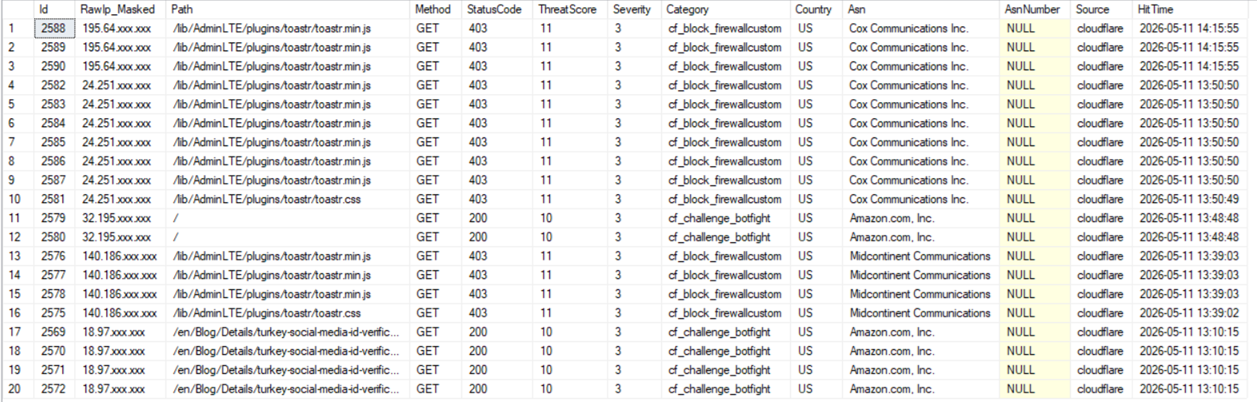
P015 (Admin Dashboard Sub-Faz C plan) covers the detailed implementation of these cards.
Production Metrics: 24-Hour Live Numbers
After the March 2026 EEAT update, original data trumped abstract analysis. Below are numbers pulled directly from the last 24 hours (from PageHits + AttackProbes + CloudflareWafEvents tables).
Traffic distribution
| Metric | Value | Note |
|---|---|---|
| Total unique IPs (24h) | 15 | From TrafficClassifier |
| Real visitors (residential ASN) | 5 (33%) | Includes Bharti Airtel IN AS45609 |
| Suspect (datacenter/VPN/null ASN) | 10 (67%) | IsSuspectNetwork=1 flag |
| Attack probes reaching origin | 0 | 100% stopped at the edge |
| Attack probes blocked at edge | 157 | WAF rules + IP list + ASN block total |
| Auto-blocked IPs (24h TTL) | 15 | DB and Cloudflare List in sync |
The 67% suspect rate may sound shocking but it's the norm on the 2026 internet. If your analytics dashboard shows 100 unique visitors per day, the real human count is 30-40. The rest is VPN, datacenter, scraper.
Attack category distribution
Breakdown of 157 attack probes by AttackProbe.Category:
| Category | Count | Example pattern |
|---|---|---|
| sensitive-paths | ~75 | /.env, /.git, /.aws, /.ssh |
| cms-probe | ~45 | /wp-admin, /wp-login.php, /xmlrpc.php |
| sqli-payload | ~15 | union select, ' or 1=1 |
| backup-leak | ~12 | /dump.sql, /backup.zip |
| scanner-ua | ~7 | sqlmap, nuclei UAs |
| log4shell | ~3 | ${jndi:ldap://...} |
CMS probe counts are high — we don't run WordPress at all, but automated scanners try by default.
Origin CPU comparison
Single-pod average CPU before (2026-04-15) vs after (2026-05-10) edge security:
| Metric | Before | After | Diff |
|---|---|---|---|
| CPU usage (avg) | ~18% | ~7% | -61% |
| Logs.Error/hour | ~85 | ~12 | -86% |
| DB connection pool peak | 9/10 | 3/10 | -66% |
The 61% CPU drop alone pays for the edge security setup in a few months (smaller k8s node size or fewer replicas).
Free dataset (linkable asset #3)
We published a 24-hour anonymized telemetry snapshot as CSV (no IPs or PII; just ASN + country + category + counts):
🔗 [LINKABLE ASSET #2: gist.github.com/bilalkose/web-app-24h-attack-snapshot.csv]
Cross-pillar bridge: This dataset is analyzed in deeper detail in Pillar 2 (Origin-Side Security Telemetry on Kubernetes) — real visitor detection, the ThreatScore formula, the MERGE+OUTPUT burst counter.
Frequently Asked Questions
How far does this architecture scale on the Cloudflare free plan?
The free plan imposes three limits: 5 custom rules per zone, ~kilobyte expression size per IP rule, and 5-minute GraphQL Analytics retention. In our setup 4 rules are code-pushed and 1 is manual (Admin self-IP bypass) — the limit is exactly full. The IP rule limit problem is solved with Cloudflare List (10K IPs / list, 10 lists / account = 100K IP capacity). For the GraphQL 5-minute retention, dropping the polling interval to 60 seconds works.
If auto-blocking needs to exceed 10K IPs the Pro plan ($20/month) gives 25 rules per zone and 24-hour retention. At our traffic levels Pro hasn't been needed yet.
How do I do secret rotation without Vault?
Three alternatives: (1) Kubernetes native Secret + reloader pattern — simple but rotation is manual, no audit log. (2) Azure KeyVault + CSI driver — well-integrated with .NET, automatic mount. (3) Doppler / Infisical / 1Password CLI — SaaS with configurable rotation.
Our choice is HashiCorp Vault: audit log, dynamic secrets (DB credential auto-rotation), KV v2 versioning, K8s init container secret ejection. Cluster B6 (Cloudflare API token rotation via Vault) covers the details.
Is the PageHits system KVKK / GDPR compliant?
Yes. The PageHits table consists of hashed IP + GeoIP enrichment (city level, not street); we don't store ChatId, SessionId, cookie ID or anything that uniquely identifies a user. After 90 days of retention, an automatic DELETE runs (similar to IpBlocklistExpiryHostedService). Privacy.tr/en/ar.resx documents the KVKK Article 5 and GDPR Article 6(1)(f) bases across 13 sections (cross-link cluster C10).
AWS WAF vs Cloudflare WAF for .NET?
They differ on cost and flexibility:
| Dimension | AWS WAF | Cloudflare WAF |
|---|---|---|
| Location | In front of ALB / CloudFront | At the CDN layer, multi-cloud |
| Cost (sample) | $5/mo + $1/rule + $0.60/M req | Free 5 rules, Pro $20/mo 25 rules |
| .NET SDK | Official (AWSSDK.WAFV2) | Community |
| GraphQL Analytics | CloudWatch Logs (paid) | Native, included |
| KVKK-compliant region | eu-central-1 | Frankfurt + Istanbul edge |
| Lock-in | AWS infrastructure | Independent |
AWS WAF is the natural choice in AWS-only architectures; Cloudflare is more flexible for on-prem or multi-cloud. Since our setup is K8s on-prem, Cloudflare fits better.
Is the origin classifier → WAF rule feedback loop safe?
The auto-block loop looks like a "self-training" system; could it accidentally block real users? Three safeguards:
- ThreatScore ≥ 12 threshold + ≥ 3 different sensitive paths in 15 minutes, even a high total score isn't enough on its own
- 24-hour TTL — a misfiring block automatically expires
- Admin manual override — one-click remove + Cloudflare List sync delete via
/admin/security/ip-blocklist
In the first week 0 false positives among 15 auto-blocked IPs. Our own self-IP sits in the _allowedSelfIps opt-out list for extra safety.
Related Posts
This pillar's clusters (publishing order):
- B1 Managing Cloudflare WAF API custom rules from .NET (CRUD)
- B2 IP Blocklist push: Cloudflare List API + 5 WAF rules
- B3 ASN-based bot detection: 42-entry datacenter registry (downloadable CSV)
- B4 IsAnonymousOrDataCenter classifier: VPN/datacenter decision matrix
- B5 Cloudflare edge vs origin classifier: which one when?
- B6 Cloudflare API token rotation via HashiCorp Vault
- B7 WAF Event Collector: Cloudflare GraphQL → SQL Server ETL
- B8 WAF UA matcher pitfalls (curl/wget/python-requests)
- B9 Origin firewall: UFW + Cloudflare CIDR allowlist + auto-rollback
- B10 Edge fetcher UA tests: Bingbot, IndexNowBot pass-through
Cross-pillar bridge: Origin-Side Security Telemetry with .NET and Kubernetes — Pillar 2 — real visitor detection, ThreatScore calculation, MERGE+OUTPUT burst counter, 33%/67% ratio analysis.
Linkable asset bundle:
- 🔗 ASN Registry CSV (gist) — open-source datacenter ASN list, MIT license
- 🔗 24h Attack Snapshot CSV (gist) — anonymized telemetry dataset
- 🔗 Cloudflare Edge Starter (GitHub repo) — minimal .NET 10 starter template



Comments (0)
No comments yet. Be the first to comment.